

Setting up an SFTP server on Windows is often painful — you either need to work entirely from the command line, or use paid tools like SolarWinds SFTP that have limitations in their free versions.
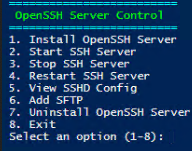
To solve this, I developed a PowerShell script that creates a simple graphical menu (text-based GUI) to install, configure, and manage an OpenSSH-based SFTP server directly on Windows.
The script provides all key management actions in one console, with clear menus and color feedback.
⚙️ Features
The script gives full control of the SFTP environment, including:
-
Install OpenSSH Server (if not already installed)
-
Start, stop, or restart the SSH service
-
View and edit the
sshd_configfile directly in Notepad (as Administrator) -
Add users or groups for SFTP access and assign them to specific directories
-
Uninstall OpenSSH Server and clean up configuration files
Everything runs from a single PowerShell window with a simple numbered menu — no manual file editing needed.
🔐 Add SFTP Users or Groups
One of the most useful features is the Add SFTP option.
It allows you to choose whether to create access for a user or a group, and specify the directory that will act as their SFTP root (chroot directory).
The script automatically:
-
Updates the SSHD configuration file
-
Adds
Match UserorMatch Groupentries -
Applies correct NTFS ownership and permissions
-
Restarts the SSH service to apply changes
This makes it easy to isolate SFTP users or client groups securely.
🧾 What the Script Automates
Behind the scenes, the script performs:
-
Installation via powershell
-
Service configuration (
Set-Service -Name sshd -StartupType Automatic) -
SSHD config management
-
Directory ACL modification for user isolation
-
Safe uninstallation and cleanup of
C:\ProgramData\ssh
💡 Why This Script Is Useful
✅ 100% free and open
✅ No external software or GUI dependencies
✅ Runs entirely from PowerShell
✅ Automates all OpenSSH configuration steps
✅ Works on Windows Server 2016+ and Windows 10/11
This makes it ideal for small businesses, labs, or IT administrators who need a quick and reliable SFTP solution without licensing costs.
📦 Download the Script
You can download it from GitHub here:
👉 https://github.com/covtandre/SFTP